
Share page: || Newsletter: Subscribe Unsubscribe
Access protection for your data through automatic encryption
If the Cryptdrive is new and not yet formatted, then it can happen under Win 8 (64-bit) that the process does not continue after the password request.
To fix this, the Cryptdrive must be started with admin rights and then first formatted!
Startmenu->Run->cmd.exe): net share X=X: /grant:everyone,full where X is your drive letter of the Cryptdrive. Then enter in the file explorer at the top of the line: \CURRENT NAME and see if a share is displayed with X and you can access it. Startmenu->Run->cmd.exe): CHKDSK X: /F, where X: is your drive letter from Cryptdrive.BAK, this must be removed. "APMDrv00" we "Cryptdrive_Backup1")"Cryptdrive Administration". Here you can remove the entry (minus icon), which should be imported again. You should answer the following question with "Remove Link"!"Import" (disk with blue arrow). Select the copied and renamed IMK file. NOTE Under no circumstances should an existing Cryptdrive be reformatted.
In the settings you can also create shortcuts on the desktop via the corresponding icon.
1. key file = [your Cryptdrive name].imk (size a few KB)
2. container file = [your Cryptdrive name].img (size corresponds to the Cryptdrive specified)
INFO: -> If the Cryptdrive was divided into several "Partitials", there are several IMG files in the directory with a consecutive numbering as 2nd file extension (e.g. ".img.0")! These must all be saved!
3. configuration file [your Cryptdrive name].ini (size few KB)
INFO: This file only optionally consists of older Cryptdrive versions, but should be saved anyway!
"Cryptdrive->Administration". In the table under file the storage location is indicated. INFO: The software automatically creates a backup of the key file when changes are made. This is created in the directory "C:\Documents and Settings\[your login name]\Application Data\apm\Backup"!
By default, Windows hides empty drives at the Computer level. This also applies to new external hard disks, for example. One reason is currently closed to us.
"Organize" select the menu entry "Folder and Search Options"!"Hide empty drives in folder Computer" disable.
Tested under:
We have not yet been able to determine the exact cause. Possibly it is due to a specially used addressing due to the 2TB barrier?
Problems with hard disks larger than 2 TB did not occur during our tests. In recent years we have used several 4TB hard disks without any problems. We usually use hard disks from HGST (c) for continuous use.
The error message says that there are problems with the service communication. Possibly the service is not started or was terminated by a security software.
Please check under
Start -> Control Panel -> Administration -> Services
whether the service apm-SAP control service is started.
If not, start manually and try to open Cryptdrive again.
Should there still be problems, possibly once abylon
CRYPTDRIVE in the settings on the page Cryptdrive deactivate, boot computer, activate again in the settings and boot again.
TIPP: It can also be helpful to temporarily deactivate the installed virus scanner or other software for this process.
This hint comes from the fact that the driver of our software was not officially signed by Microsoft. However, this will affect NOT the functionality of abylon CRYPTDRIVE or restrict Windows 7. The signature by Microsoft is associated with very high costs for the software providers. Since we want to offer our software at a reasonable price, unfortunately there is no way around the test mode. Therefore a deletion or hiding of this reference from your side is unfortunately not possible, if you want to use our software.
A. New installation
Windows\system32\drivers contains the file APMDrive.sys. If yes, delete it.B. Manual Copy
WARNING: Perform as last option only - can be considered an attack by Windows, which permanently disables this driver!
Windows\system32\drivers.APMDrive.sys.APMDrive.sys um.NOTE: For further causes see the following FAQs!
The driver status cannot be determined correctly because of the rights. For this reason the switches are deactivated. In the next version this problem should be corrected.
HKEY_CURRENT_USER\Software\abylon\CRYPTDRIVE\Connections\CRYPTDRIVELimited User and import the entries into the registry by double-clicking. The CRYPTDRIVEs are then available for the Limited User.
NOTE The folder and the contained files must all have User Read and write permission!
After opening a CRYPTDRIVE, it is displayed directly in a separate File Explorer window. If the computer is too slow or too busy, this error message appears. However, the CRYPTDRIVE was opened correctly, which you can check in the File Explorer.
The automatic opening in an own File Explorer window can be deactivated in the settings. To do this, open Settings, select on the page
Cryptdrive the corresponding drive and press the button Edit. In the settings dialog you can disable the option Open in your own Explorer window.
This message appears in connection with certain CD-ROM drivers, CD-ROM burners, virus scanners or similar programs which make an incorrect system entry or install an incorrect driver. When opening the settings dialog, our software internally checks the availability (ONLINE) of all connected devices. Unfortunately, due to the incorrect system entry or driver, the return value received is not correct, which causes this message to be displayed very occasionally.
To open and close the CRYPTDRIVE drives, you do not have to constantly open the settings dialog, but can create shortcuts from the desktop. You have to open the settings dialog once, select the corresponding CRYPTDRIVE in the list and click the right mouse button. In the displayed menu select Create shortcut on desktop, which creates two shortcuts from the desktop. The green icon opens the CRYPTDRIVE and the red icon closes it.
Since version 10 the icons for opening and closing the Cryptdrives are automatically created in the directory [drive]:\Users\[login name]\Documents\abylonsoft\abylon CRYPTDRIVE.
.IMG, *.IMK) and/or in the network, the corresponding read and write rights do not exist! Check here not only the pure file permission (NTFS) but also the write permission for the network share.INFO Generally with Windows Vista or other operating systems for users with restricted rights, the "SYSTEM User" must have full read and write rights!
ABHILFE Please check the read and write permissions in the CRYPTDRIVE memory directory and add them accordingly! If necessary, consult your administrator.
ABHILFE Create a local copy of the CRYPTDRIVE (*.IMG, *.INI and *.IMK) and import the local copy into the abylon settings. The network CRYPTDRIVE should always be divided into several partitials, so that the partitials are about 1 GB in size!
FORMEL: Size of the CRYPTDRIVE in GB = Number of partitials (e.g. a CRYPTDRIVE with a size of 10 GB should be divided into about 10 partitials)
ABHILFE Registry-Patch for manual reactivation of the driver. After executing the registry file, the computer must be restarted!
Download the registry patch without guarantee: BUG_CRYPTDRIVE_ACTIVATE.REG
ABHILFE: We recommend to make a backup copy of the CRYPTDRIVEs at regular intervals! If the CRYPTDRIVE is divided into partitials, then a backup to e.g. DVD is also possible with large drives.
"E:" to "F". In this case the software does not find the CRYPTDRIVE anymore, displays the error message and requests a new password. In the File Explorer and Settings dialog, check whether the paths match. If not, you can proceed as follows: Since version 10 our software abylon CRYPTDRIVE scans all existing drives for the Cryptdrive. If the drive cannot be found at the saved location, it will be searched for it on all other drives as well.
Execute the command CHKDSK [your USB drive:] /F in the DOS input window. The DOS window opens under STARTMENU -> EXECUTE with CMD.EXE. This function checks the drive for errors, but does not generally fix the problem.
Especially when formatting the drive over the network problems can occur!
Splitting the CRYPTDRIVE into Partitials: The number of Partitials indicates how many parts the file in which the encrypted data is stored is split into. For this you have to create a new CRYPTDRIVE, where the number of Partitials is defined in the settings dialog. You should select so many Partitials that these are a maximum of 2 GB.
FORMEL: Size of the CRYPTDRIVE in GB / 2 = Number of Partitials
(e.g. a CRYPTDRIVE with a size of 10 GB should be divided into at least 5 Partitials)
Create and copy locally: Alternatively you can also create the CRYPTDRIVE locally on your client. Then you only have to copy the complete files (*.IMG, *.IMK and *.INI) to the server and import the CRYPTDRIVE from there!
Explorer -> right mouse button -> Properties) and exit it for that drive. This reduces access and optimizes performance.NOTE We test our software on all possible systems. Unfortunately, due to the large number of different hardware and software, we cannot exclude all interactions.
This error message says that possibly only the key file is damaged and possibly the data still have to be recovered.
"Documents and Settings\[USER]\apm\Backup" and search accordingly the automatically created BACKUP from the IMK - file and copy this into the directory, where the IMG - files of the same name are located.STARTMENU->Run->CMD.EXE and type on the affected drive (where the IMG files are stored) the command
CHKDSK /F on to check the hard disk and repair it if necessary (a restart may be necessary).NOTE Also encrypted drives should be backed up at regular intervals. The individual partitials can be used, for example, to back up the files to one or more DVD's.
The problem with System Restore is NOT a special abylon CRYPTDRIVE error. It can occur with all virtually configured drives, which are not always or not real available. This includes the abylon CRYPTDRIVE as well as removable media (e.g. USB sticks).
The operating system sets a storage area for the system recovery points of all hard disks. However, if virtual or external drives are added, the original disk space is no longer sufficient and this error message may occur.
Internal tests have shown that System Restore is most likely only closed for CRYPTDRIVE and not permanently and for all drives. For this reason, there should be no problems for the stability and security of your system.
See also articles from Microsoft! >> System Restore restore points are missing or have been deleted
For the simultaneous access of several users to an encrypted abylon CRYPTDRVE an installation of the software on a server is necessary. There the encrypted drives are created and after their opening once the authorizations (NTFS system) are assigned. See also the instructions for special shares.
The encrypted drives must be opened after each server boot. This process is automated by creating a batch file during autostart. Now the simultaneous access of the individual users can take place over the network. The encryption and decryption of the data is carried out on the server, so that the transfer of the files over the network takes place unencrypted.
NOTE When installing abylon CRYPTDRVE on the client and only storing the drives on the server, the transfer of the files over the network is encrypted. However, with this use, no simultaneous access of several users to an encrypted drive is possible. A combination of both possibilities is NOT possible.
For the simultaneous access of several users to the same database you should also have a look at our software products abylon SHAREDDRIVE and abylon CRYPT in the BOX.
For this purpose you have to create a batch file (e.g. startdrive.bat) and put it into the autostart of Windows.
@echo off
"C:\Programs\abylonsoft\abylon\APMPCaller.EXE" "Drive1" /MOUNT
net share "Sharing folder"="M:\Directory1"
net share m$ /delet
M:\Programs\Graphic.exe
@echo on
2. line = Automatic opening of the CRYPTDRIVES with the name "Drive1"
3rd line = Set up the share of directory 1
4th line = Removes the administrative share on drive "M"
5th line = Automatic start of the program "Grafik.exe"
The NTFS security settings can be assigned as usual once in the File Explorer via the right mouse button Settings -> Security settings!
HINWEIS For a function definition and further administrative possibilities enter in Start -> CMD
net share /?, net use /?, net view /? and net user /? or read the corresponding Windows document concentration!
Select drive in File Explorer -> right mouse button -> Properties -> General -> "Index drive for quick file search" -> DEAKTIVIEREN)NOTE You should always close all drives before shutting down to prevent data loss due to open files!
If you have shared the virtual drive in the File Explorer, the corresponding permissions can access this drive even if you are logged out. For example, the owner of the drive does not have to be logged in all the time to make data available on an encrypted virtual drive.
To prevent access, you only need to close the virtual drives before logging off.
Pleasantly, no virtual drives can be selected and cleaned with the defragmenter integrated in the operating system. However, you can use almost any defragmentation tool for this, such as Diskeeper (www.diskeeper.de) or O&O Defrag (www.oo-software.com).
To make sure that the operating system saves the complete cache when shutting down, all open virtual drives should be closed first. Normally an open virtual drive does not lead to an error during shutdown.
This error can occur when opening an old drive with the new version of abylon CRYPTDRIVE. It is not tragic and can easily be fixed with the following command.
Start -> Run the command CMD.chkdsk L: /F /R and press Enter button (Caution: Replace L: with the letter of your virtual drive)This error occurs when the driver (apmdrive.sys in
Windowsverzeichnis/system32/drivers) was not found or not loaded. First you should simply boot your computer and try the operation again. If it still doesn't work, call APMSetup.EXE once to deactivate and then APMSetup.EXE to activate and boot your computer. Now it should work. If the file APMDrive.SYS is still not registered in the Windows driver directory, it can be a rights problem (you may not have the right to copy files there). In this case please contact your system administrator.
When setting up the virtual drive, an image file is created in the size of the drive, whereby the image file can be split according to the selected number of partials. All files are stored encrypted in this image (container). The access permissions can be controlled via certificates.
With the data drive, each file is stored in a sequentially numbered and encrypted image file. The access permissions can also be controlled via certificates.
You can also read our instructions for comparison of encryption software!
When creating the virtual drive, you can store the corresponding image file directly on another computer (e.g. server). To do this, enter the path with the UNC name of the computer in the corresponding field (\SERVER\PFAD\XXX.IMG). Alternatively, you can also select any directory in the network using the ... button. With this button you can move already created virtual drives at any time.
If you want to access a virtual drive for the first time that has already been created on the server, simply import the corresponding image file. After pressing the Import button, a dialog opens for selecting a IMK file (or INI) that contains all information about the virtual drive and the image files. This can be located in any folder in the network. Any user who has installed the corresponding software on his computer can import this image file and open it with the appropriate key.
There may be problems with the virtual drive under certain circumstances if the properties Compressed and / or Encrypted have been activated.
To ensure error-free operation, disable these properties!
This error can occur, for example, if the drive was created by an administrator and you are only a user or main user. In this case, you most likely do not have the appropriate rights to read, write or modify the CRYPDRIVE files. The administrator must assign the appropriate rights to the folder under Properties -> Security settings. Of course, the directory must also be shared by all users.
Information about password usage and related security issues.
For this purpose, a mouse click event was inserted programmatically from version 19.10.1 and 2020.1 on. If there are problems with this, it can be switched on or off via the registry. To do this, under HKEY_LOCAL_MACHINE\SOFTWARE\abylon\[PROGRAM NAME, e.g. ENTERPRISE]\FLAGS set the value FWACTIVATEWINDOW from YES to NO.
After the password entry the software displays the message "The entered password is wrong or the key file (certificate) does not belong to this object!". What is the reason for this?
Please check first whether the password was really entered correctly or the keyboard layout has changed.
Another possibility is that the password scrambler converts certain special characters into other characters. For this reason it is necessary in such cases to activate or deactivate the password scrambler according to the creation of the encrypted element. I.e., if the password scrambler was activated during encryption, it must also be activated during decryption.
The password scrambler must be deactivated in any case if a password or the SecureID are entered into the password field via Copy&Paste. Otherwise, the program will not recognize a keyboard entry and the password field will remain empty.
The SecureID is a so-called emergency password. If the chip card or USB stick is defective or lost, this can be entered as an alternative for decryption.
The SecureID is determined during the encryption process on the page 'Key management >SYMM-System'.
The SecureID is identical for each encrypted object (abylon KEYSAFE, abylon CRYPTDRIVE, abylon BASIC, abylon SHAREDDRIVE) and is built as follows:
# + 32 characters + . + 32 characters + #
(characters only numbers 0-9 or letters A-F; e.g. #A54E1CB23F31464AC3B7D65F4557C1D1D. 50F4B4A9EC30705944EB12870284C419#
NOTE
- Starting with version 8.3, both upper and lower case letters can be entered. In older versions the input is Case-Sensitive.
- The password scrambler should be deactivated for input!
- The SecureID should be stored in a secure place!
- The SecureIDs are different for encryption and Windows logon.
A "brute force attack" means trying out all possible character combinations of passwords. For example, the process starts with 00000001 and then continues with 00000002, 00000003, 00000004.... A password that has only 4 digits and consists only of numbers can easily be "cracked" within a few seconds. A good password should consist of at least 12 characters with lower case letters, upper case letters, numbers and special characters. In addition, no words from dictionaries, names or relevant password databases should be used. If you follow these rules, you can be sure that it will not be possible to decrypt the protected data economically in the foreseeable future.
Unfortunately / fortunately it is not possible to open protected data without the corresponding password. I.e., the software of abylonsoft offers neither a back door nor a so-called "general key". If you have lost your password, you can no longer access your stored data.
You should remember the used passwords well and possibly write them down in a secret place. However, this should not be on the hard disk or near the computer. Alternatively, so-called password managers (such as abylon KEYSAFE) offer the possibility to store the different passwords in a secure database. In this case you only have to remember a password
An insecure password is always a date of birth, a nickname, a name in principle or any other word that is frequently used or that is in the dictionary.
A secure password is a password consisting of several random characters, e.g. myz<_/k)),%06YLbcw3pU. It consists of special characters ( ! "§$%&/()==?´*?+#´\ß^.;:_@<>|{[]}), numbers (1234567890), uppercase letters (QWERTZUIOPÜÄÖLKJHGFDSAYXCVBNM) and lowercase letters (qwertzuiopüäölkjhgfdsayxcvbnm).
If you cannot remember such a password, you can use a trick. Although the password is not as secure as the previous one, it is still much more secure than "Otto" or "Müller". And this is how it works. Think of a long sentence that you can easily remember, such as : I live in the model city 134b. My phone number is 123456789. Now simply take the first letters / characters from this sentence. In this case that would be? IwidM1.Mti1.?. However, you should make sure that at least some numbers and special characters are present in the sentence. In addition you must pay attention to upper and lower case.
To create a really secure password, you should use the integrated password generator. You can find it for example in abylon KEYSAFE.
Questions and Answers about the installation of software products from abylonsoft.
Usually, with abylonsoft software, the new version can be installed over the old version. This is also the case if the setup asks in advance and offers the uninstall option. If an over-installation for any reason is not possible, so you will be pointed out during installation. In this case no other option is offered.
Yes, because during the installation the software has to make some settings for which only the administrator has rights. So log in for the installation as an administrator or contact your responsible administrator.
Possible cause of error:
Updates in the same major version number are free. Updates to the next major version number are subject to an update fee. If you have any questions or problems with us you are welcome to contact us in Kontakt.
This is because when a new user is created, Windows first creates the registry and makes entries. Since our software also has to make registry entries, an operating system restart is required for proper operation.
.If this error occurs, you should manually download and install the setup from the download page. All settings of the previous version will be adopted.
General questions and answers about the software from abylonsoft.

We unfortunately had to realize that Microsoft has changed something since the end of the Windows 7 support. Since that time it seems to be necessary to install a so-called Redist-Pack of Microsoft Visual Studio. This was not necessary before, but now it seems to be absolutely necessary. Please download and install the Redist-Pack of Microsoft Visual Studio 2008.
Alternatively please use our contact form for further information! Please indicate the software version and operating system.
From version 19.1 or 2020.1 the appropriate Redist-Pack is delivered with the setup.
First of all, passive RFID tokens (chip cards or key fobs) need a magnetic field or high-frequency radio wave to be supplied with energy. This is usually done by the RFID card reader. The data integrity on the RFID token is not endangered by light magnetic or radio fields. The data is not likely to be erased, for example by a mobile phone, a magnet or a monitor. However, an electromagnetic interference source can lead to an impairment of the reading reliability.
Storing the RFID token in the same pocket as the mobile phone is no problem. In order not to disturb the reading process, the RFID card reader should be placed as far away from electromagnetic sources as possible! In a microwave, on the other hand, the RFID token is likely to be destroyed.
Tray-Icons are small buttons, which are displayed in the taskbar at the bottom right, next to the clock.
These icons are used to display information and call functions. In the preferences, Windows deactivates tray icons of programs so that they are not displayed for the time being. The following section describes how the settings for all or individual icons can be set.
NOTE The description is general. Depending on the program, you must select the appropriate tray icon. You can find this in the help or the FAQ's.
To the left of the clock, there is a small white arrow pointing upwards, which can be used to display the other tray icons.
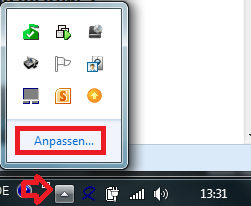
With "Customize" you can define the behavior of the tray icons. The "Info Area Symbols" window opens.
NOTE Below are alternative ways to open this window.

In the settings window for info area symbols, you can define the behavior of each individual tray icon.
Select the corresponding icon and select "Show icon and notifications" as option. After that you will find the tray icon on the taskbar to the left of the clock at any time.
Alternatively, you can enable the option "Always show all icons and notifications on the taskbar". In this case, the tray icons of future programs will also be displayed directly on the taskbar.
Move the mouse to a free area of the taskbar and press the right mouse button. Select Properties from the menu. The dialog for customizing the info area symbols opens on the Taskbar page via the "Customize" button.

As a further option, you can also open the Control Panel via the Start menu. Select "Large Icons" or "Small Icons" in the upper right corner. Now you can open the settings via the "Info Area Symbols" icon.

Because of errors in the operating system or other software, as well as the variety of the hardware used, apparently occurring errors and / or irregularities in the software of abylonsoft must not necessarily be justified in this software. This means that the interactions between our software and software / hardware from other manufacturers are so complex that they cannot be taken into account by us in all cases. Often errors / defects in other software (e.g. the operating system) also occur, which only become effective in combination with our software. These errors usually manifest themselves in a general protection violation or a system crash. For these reasons we subject our software to a very extensive test before release in order to reduce the problems and errors to a minimum.
Should you nevertheless become aware of a direct error in our software, we will correct it as soon as possible. So that we can understand the error / the problem, you should give us all the details:
Please use our support form support form!
for this purposeFor more see AGB's
Questions and answers for compatibility tests of our software products with special hardware.
Microsoft has disabled the automatic installation of the framework .NET 3.5 under Windows 10. This causes crashes and protection violations during the execution of the .NET 3.5 versions of abylonsoft.
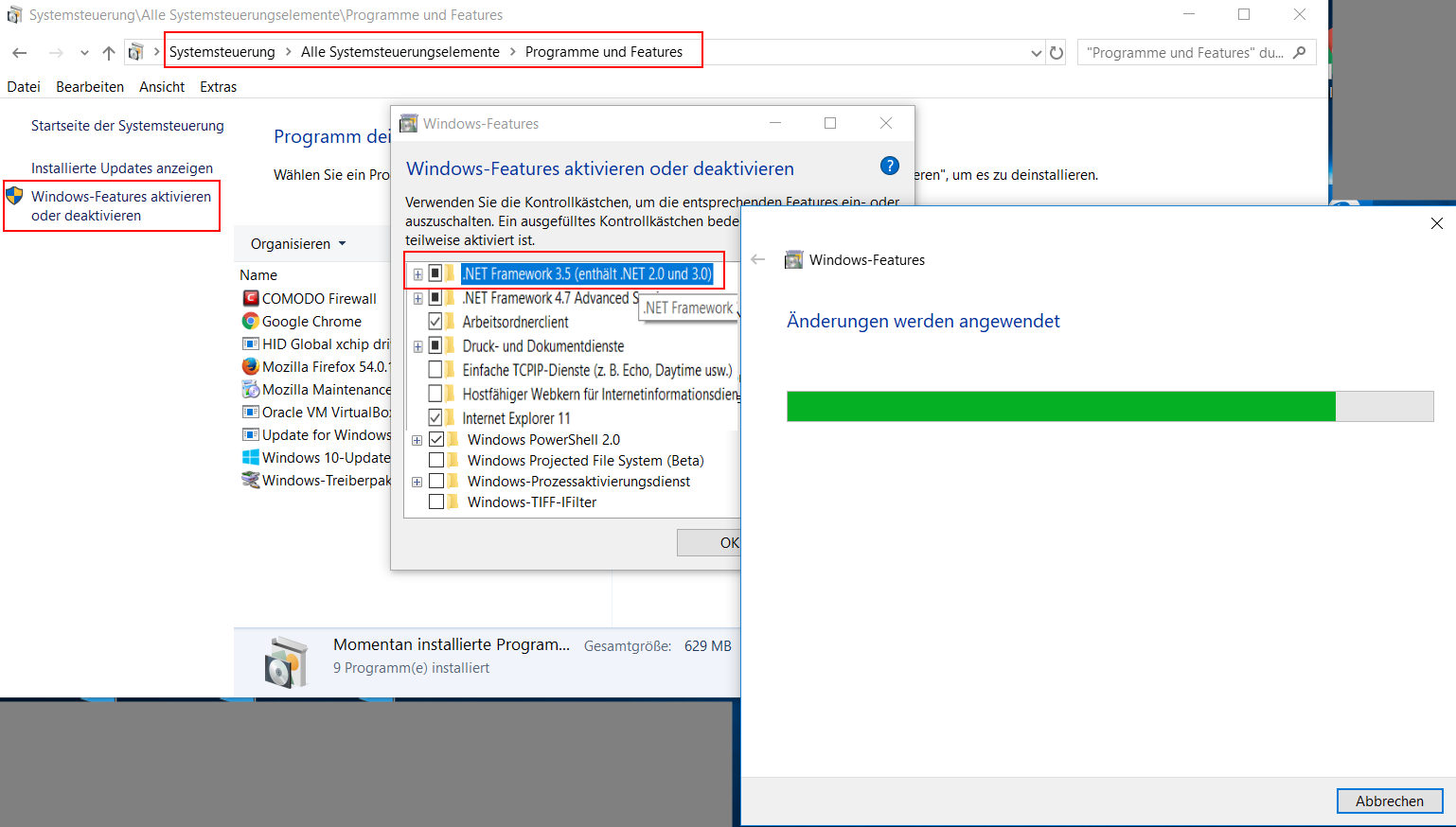
As shown in the screenshot, Microsoft .NET 3.5 can be enabled via the Windows features:
subsequently the version
To use a removable disk (e.g. USB stick) as "key" for login and encryption or mobile use (switch "install modules on USB stick"), the following conditions must be met:
Card reader:
Our software supports all card readers that offer the standard PC/SC interface. In addition, you have to pay attention to which smart cards are supported by the card reader. In addition to contact smart cards, there is a large variety of suppliers and different technologies available for wireless smart cards. Here the supported frequencies 125 kHz (long wave) and 13.56 MH (short wave) are to be mentioned for example.
chip cards:
Our software can be fully tested for 30 days. You should definitely take advantage of this offer. If you have any questions about compatibility, you can also contact us with confidence approach.
On our hardware page you will also find a selection of compatible card readers and chip cards.

Hello:
I have downloaded the free version of your software from Bits du Jour and I thank you very much for it.
1. I cannot find the symbol you mention in your Help program to create my own certificate and I don't know enough about them to know if I have to create one before I can encrypt my folders or not? If I must create one, where do I find the link to create my own certificate?
2. I need to create an encrypted folder on a flash drive. The reason for this is that the flash drive will be installed in my NAS and, if the entire partition is encrypted, Windows cannot find it. So, I hope by making two 'fake' partitions (actually two folders, one encrypted by your program and the other containing other information that does not require encryption, I am hoping that I can fool Windows. But I can't tell until I can encrypt a folder. I seem to require some in-depth instructions as to how to do this.

To 1) For an encrypted CRYPTDRIVE is not necessarily a certificate required. If this is desired, a self-signed certificate can be created via the integrated certificate manager. To do this, the settings dialog must be started with admin rights and the certificate manager must be opened on the Key Management->HYBRID System page via the icon bar.
To 2) I have once created an instruction picture for you. The image has German labels, but other languages you will find the options in the appropriate place:
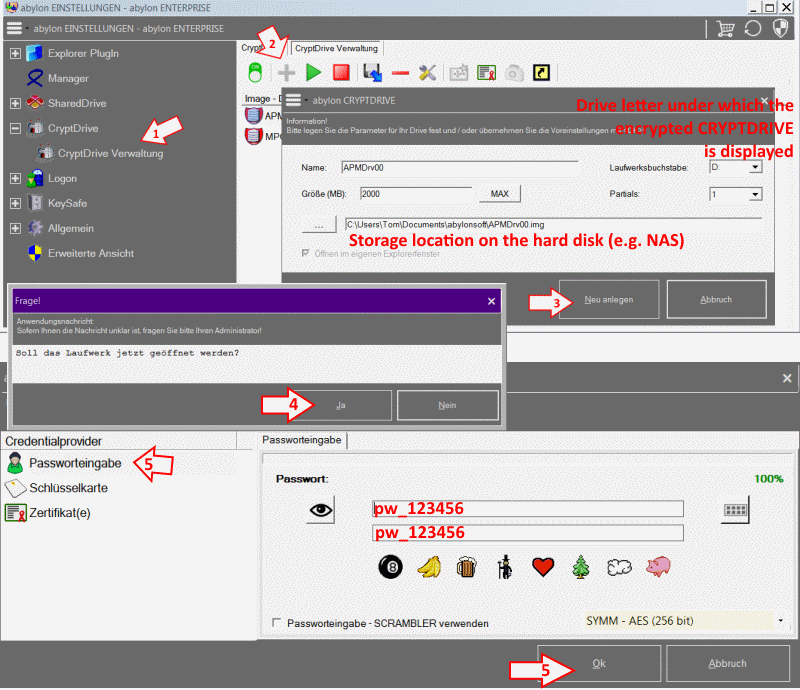
Instructions in keywords:
I hope this is clear? Otherwise just write again describing the problems as detailed as possible.

I received a 'Name or CD Key' and 'License Key this morning for the Giveaway of the Day version of Abylon Cryptdrive. I somehow downloaded and installed a newer version which does not accept the login information I have. I will uninstall that version and would like to download the correct one, 19.x (Adv. - PRIVATVERSION), but cannot find my way back to the original free offer page or to a download location for the proper version.
Hi Paul!
I am sorry for that. But the free registration data is only valid for the special version of GiveawayOfTheBay. For technical and legal reasons I personally can not offer the setup.

My encrypted Drive created by Abyloncrypt had disappeared, so how can I make it reappear again or how can I recover my lost files?
thank you
Thank you very much for sending me the screenshot. From this you can see that there are no encrypted drives. Some tuning tools destroy the registry entries, which makes this disappear. In this case, you must import the corresponding image files via the import icon (diskette with blue arrow). These have the file extension "IMK" or "INI".
If you have any further questions, please do not hesitate to contact us again.

Hello,
I intend to use an external SSD utilizing the CRYTDRIVE16 on a number of different Machines(laptop, tablet etc.) running Win10 64bit.
Does it mean I have to activate and format the SSD with each machine beforehand (before I am able to store any data)?
For example, one desktop, one laptop and one tablet (all three running Win10 64bit)
Cheers
No, on the SSD once a Cryptdrive must be created. This is formatted there. Afterwards you can import this Cryptdrive on the other computers. If the password or hardware key is correct, you can access the encrypted data directly.
Hello, your CRYPTDRIVE16 works great on Win 10 Pro 32bit Version 1703 OS Build 15063.540
However, the exact same Win10 but 64bit system keeps popping the message: "apm-virtual disk driver abylonsoft - Windows blocked the installation of digitally unsigned driver"
Please advise.
Cheers
Hi Rich,
The software abylon CRYPTDRIVE runs under Windows 10 64Bit. However, our software does not use an officially signed driver for various reasons. We have self-signed drivers. For our software to run under 64bit, the operating system must be converted into a so-called "test mode". This is done by our software during installation or activation. Only if this question is answered with "Yes", Windows accepts our driver. Without the driver, our software is not executable. According to our knowledge, the "test mode" does not imply any restriction.
If something is unclear, please feel free to contact us again.

Can Cryptdrive be set to unload upon hibernation of system? I am currently running/evaluating Abylon Cryptdrive and Cypherix Cryptainer PE. When the system automatically hibernates, Cypherix closes the container file. When I log back on after hibernation, Abylon Cryptdrive is still mounted and open.
Hi Jerry,
it is true that in the case of the [b]hibernation [/b]the Cryptdrive will be not closed. This is not intended and [b]could cause problems[/b]. Only when you drive down your computer or via the "Close" icon the Cryptdrive can be closed.

Sorry, I earlier asked for information on how to locate the registration data input in CryptDrive. I looked more and discovered where to put it.
Sorry for any inconvenience.
Herman Carnell McCrea
There are several options for accessing the dialog box for entering the registration data:
1 About the Windows Start menu -> Programs -> abylonsoft -> Program -> Enter license code
2 About the button (Enter license) or the icon (ID-card) in the program or setting dialog
3 At regular intervals, the registration dialog is displayed when the program starts.
For general comments, please use our Comments Form!