
Share page: || Newsletter: Subscribe Unsubscribe
Automatic and secure Windows login with smart card, USB stick or CD
At the moment there are no specific FAQ's available. At the end of this page in the support area you will find our answers to user questions.
Frequently asked questions about Windows login and the administration of the software abylon LOGON (various variants).
Stop card monitoring before running the setup. This is done via the tray icon menu to the left of the clock (see screenshot). This will make the over-installation work properly.
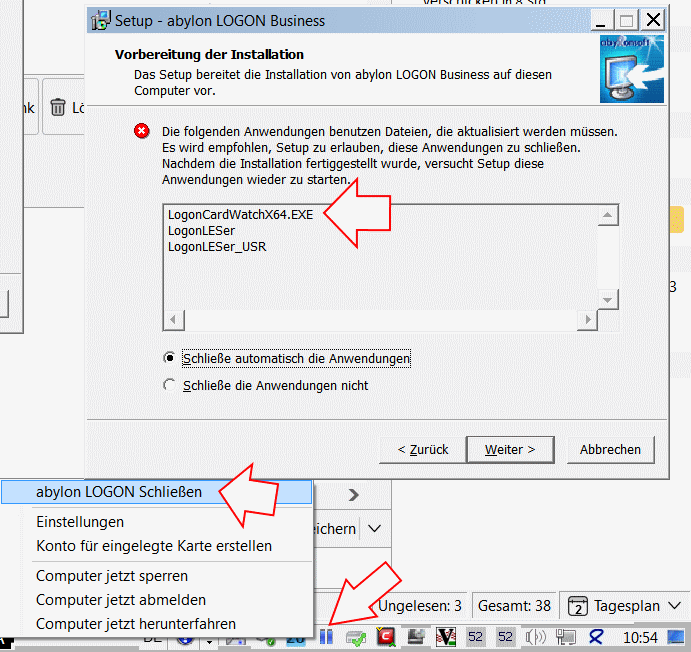
Open the Windows Task Manager and search for the application LogonCardwathX64.exe under "Processes". Use the right mouse button menu to close the application via End Process. After that runs the setup without problems.
In the Windows registry (for instructions, see the glossar), under \"HKLM\Software\abylon\
With this change, the .NET framework will be started via an alternative call.
Here we distinguish 2 possibilities:
A mixed use of abylon LOGON and abylon LOGON Business is not possible. The synchronization of the Logon accounts is primarily done via the client. The logon account data is compatible, but the simple logon version does not offer synchronization. For this reason abylon LOGON and abylon LOGON Business can NOT be used together!
If the software abylon LOGON or abylon LOGON Business is used on several computers in the network, this is also possible with different version numbers. This is necessary for example to update step by step to a new version. However, the version step should not be too large (test required). To avoid problems, the same version should be installed on all computers.
The Credential Provider is responsible for the user login under Windows. Es gibt einige Programme, welche diese ergänzen oder ersetzen, wie auch die Software abylon LOGON. Errors or compatibility problems can therefore lead to unexpected and strange problems with the Windows login.
The easiest way to check is via the Windows registry. Hier werden alle eingetragenen Credential Provider unter folgendem Key gelistet:
HKEY_LOCAL_MACHINE\ SOFTWARE\Microsoft\ Windows\CurrentVersion\ Authentication\Credential Providers
To troubleshoot, first identify all programs with credential providers and then disable or uninstall them one by one.
In our encyclopedia you can find a short description about Credential Provider.
If in the Logon settings under Logon settings the item Do NOT allow account creation for new chip cards during Windows logon is deactivated, the abylon LOGON software offers the following option. New hardware keys can be learned during the Windows logon so that they can be used for the Windows logon in the future. The software goes through a loop for this process. If the cancel button is clicked at the wrong time, the software will not respond.
Workaround:
In this case, the potential hardware key (e.g. chip card, USB stick, memory card, CD) should be removed from the computer! After that, switching to the normal Windows login is possible without any problems.
In the basic setting in the Logon Settings under Login behavior the item Allow change to normal logon with abort (ESC) in login mode is activated. If this option is disabled, switching to the normal Windows login screen is prevented.
Previously, it was only possible to create logon accounts that already existed on Windows. From version 20.6, the software abylon LOGON Business takes over the creation of non-existing Windows users for them. Alternatively, the credentials can be saved without a successful credential check.
CAUTION
This option is NOT offered in abylon LOGON!
Even on domain servers the syntax of username and domain is important. If a known Windows user is not accepted, this may be due to the input of username and domain.
On our test systems, the following entries were successful:
In contrast to VNC, with RDP the user is logged in with his own session on the server and access to the card reader is not possible on the client. In this case, the card must be created directly on the server (without RDP) or the card reader must be connected to the client with RDP support. Alternatively, a remote VNC connection from the client to the server can be used.
If abylon LOGON is activated, the Windows lock window can only be leave under Windows 10. When pressing the Cancel button the "normal" Windows logon screen is displayed.
On older Windows operating systems a login window of abylon LOGON is displayed. Here the password of the locked user can be entered via the keyboard.
The card monitoring is only active if the user has logged in with a hardware key via abylon LOGON. With started card monitoring an appropriate icon (two blue, vertical bars) is indicated in the task bar. About this icon some functions of the software abylon LOGON can be called.
After the installation of the software abylon LOGON the card monitoring is NOT directly active. After learning a new logon account the computer should be restarted. This may also be necessary when changing settings!
INFO
Beginning with version 18, the reliability of card monitoring has been significantly increased once again by an additional service check.
Straightforward under Windows 10, we have observed that access to a smart card can take a very long time. This makes it look as if the software is hanging. This is because the operating system searches online for a driver for the card reader and/or the smart card. Windows often replaces the card reader manufacturer's driver with a standard driver from Microsoft. This can also lead to the described problems.
These problems can also occur under Windows 7 or 8, although less often.
Aid:
First of all you should check in the Windows Device Manager which drivers are entered in the card reader and the smartcards. In this case, a deactivation of the corresponding device (described below) may help.
Another option is to disable the automatic search for drivers. For this purpose we have created a registry patch. This patch can be downloaded under exclusion of a guarantee and liability under the following link.
Download Registry-Patch (at your own risk): Save target as
WARNING
Please execute this Regpatch only if you know what you are doing and have the necessary technical background. If possible, create a backup or a system restore point beforehand.
In the settings on the page Logon settings -> Login settings the item Do NOT allow account settings for new smart cards during Windows logon is activated. On certain systems this can lead to problems when learning the hardware key.
This setting item should be deactivated as a remedy. The setting only takes effect after the computer has logged off once. Our development team is currently looking for a solution to this problem.
This phenomenon occurs because the Plug&Play functionality of Windows searches for drivers for the hardware key (e.g. RFID chip card or contact chip card) when inserting the card. This involves searching the computer and the Internet, which can take from several minutes to an hour. During this time, access to the hardware key by our software is not possible. Either the error message appears after a certain time or the software is blocked.
Aid:
Even before you hang up the smart card, the device manager should be opened in the Control Panel:
Win 7: Start menu -> Control Panel -> System and Safety category. -> System section -> Device manager
Win 10: Start menu -> In text field Device manager enter and confirm
Then insert the smart card and wait until Windows has completed the driver installation. This action can take several minutes. If the smart card is installed by Windows, you should mark and deactivate it before the execution of abylon LOGON. The device manager shows under Smartcard the entry Unknown Smart card. Via the menu of the right mouse button it can be Deactivated. Usually the smartcard will be displayed as Generic directly after the activation. Now the software abylon LOGON can be used with the smartcard or the token as hardware key.
If the smartcard is not displayed, the unknown devices may be hidden. In the menu under View the item Show hidden devices can be activated.
As username and password the Windows account enters the login name and the assigned password.
Under Windows 10 it may be that the username must be specified in a special syntax:
Info at Microsoft.
The Windows accounts are defined in the control panel under User accounts. An empty user account or an account without a password is not allowed!
Domain / workgroup the following can be specified:Normally the host name should be there, so no customization is required.
SALogon.exe or 64-bit SALogonx64.exe/RESETACOS3 supplement "[PROGRAMMPFAD]\SALogonx64.exe" /RESETACOS3Caution: This command line call is only available from version 15.30.3.
driver is searched for.Driver for smartcard not found (also takes a few minutes)!Start -> Control Panel -> System -> Device Manager).Other / Other devices). Then right-click Select Smartcard and select Disable in the context menu that appears!Important! If the creation of an abylon LOGON account with the processor chip card (smartcard) does not work, the smartcard must definitely be deactivated in the Windows device manager (as described above).
If the entry Smartcard with the exclamation mark is not displayed, the card reader should be removed from the USB port when the device manager is open and plugged back into the port with the smartcard inserted. The view in the device manager can be updated via an icon!
Even in safe mode, the Windows password must be entered.
In order to use a Windows password that is really secure against cracking, it should be as long as possible and contain numbers, uppercase letters, lowercase letters and also special characters. This can lead to the fact that the password is difficult to remember on the one hand and on the other hand has to be entered laboriously via the keyboard.
...And here comes the software abylon LOGON into play, which takes over the password input without you having to renounce the security.
Logon Accounts via the icon with the barcode (far right). To do this, the corresponding user must be selected in the list.With the software abylon LOGON there is no limit to the number of keys used. In principle, any number of keys can be configured for a Windows logon account!
The possibility of logging on to the computer in secure mode does not pose a security risk if the Windows logon password is sufficiently secure (at least 12 characters, as well as the use of special characters, numbers, upper and lower case letters).
The SecureID is a so-called emergency password. This can be entered in the logon mask as an alternative to the Windows logon password if the chip card or USB stick is defective or lost.
The SecureID is determined during the setup of the Logon account or in the Setting dialog on the page Logon -> Accounts.
The SecureID is different for each Windows logon account and is structured as follows:
# + 48 characters + ## + 32 characters + #
(characters only numbers 0-9 or letters A-F; e.g. #01699A9534F683073795238AC7F12DA1950E0C3A08060202#
#44D6D243E0AEF35FAFE4CB4A24087578#
NOTE: - Starting with version 8.3, both upper and lower case letters can be entered. In older versions the input is Case-Sensitive.
- The password scrambler should be deactivated for input!
- The SecureID should be stored in a secure place!
- The SecureIDs are different for encryption and Windows logon.
In About - Dialog the installed operating system is displayed wrong in the upper right corner. Due to different techniques between Windows XP and Vista the software abylon LOGON cannot be activated.
Start -> Run -> RegeditHKLM\SOFTWARE\abylon\LOGON\XP, VISTA, WINDOWS7 or WINDOWS8 according to your operating systemNOTE: This option is only available from version 7.3!
In general, the card reader connected to the client is recognized with the default settings during the Remote Desktop connection and can be used directly.
If the card reader should not be recognized, it can be activated when creating the remote desktop connection under Options -> Local Resources -> Local Devices. Another setting option can be found under Terminal Services Configuration -> Connections -> Properties -> Client Settings -> Connection Settings of User Preferences or correspondingly in Policies.
Following card readers were tested successfully: Card readers from Cherry, Cardman 2020 and comparable, and the Aladdin eToken (USB token)!
To use a USB stick, it must also be known during remote desktop login.
After configuring your system it may happen that after unlocking the computer the Task-Manager is displayed. To prevent this you can skip in the abylon SETTINGS on the page Logon -> Advanced under Login Behavior the option Should the security dialog (PREVIOUS REGISTRATION PRESS CTRL+ALT+ENTF) be skipped automatically? deactivate (no check mark).
The software abylon LOGON is NOT active in secure mode (without network). This is a protection from our side, so that you can deactivate the software abylon LOGON in an emergency, without having to reinstall your whole system.
Even in safe mode, you must enter your password for Windows logon, so that this cannot be exploited for an attack. In normal operation, you do not need to enter your password for the Windows logon, just plug in the medium (chip card, CD, USB stick) and the Windows logon takes place automatically. For this reason, you can use an extremely long password (at least 12 characters, including numbers, special characters, small and capital letters). The longer the password is, the harder it becomes for an attacker to crack the password. This makes your system much more secure than if you use no or a short password. Only with the appropriate medium (chip card, CD, USB-.Stick) the Windows login is possible.
NOTE: For domain networks access can be deactivated via the secured mode!
This problem occurs due to problems with the Aladdin CSP when resetting the certificate store in the system user context.
Thereby the learning of accounts for the Aladdin eToken is only possible in the settings dialog of abylon LOGON. However, this has no effect on the use of the Aladdin USB token with our software.
For monitoring the pulling and inserting of the smart card or the USB token, it is necessary to start a service. After the installation the program must be activated in the settings and the computer must be booted once. In order not to burden the system resources unnecessarily, this service will not be started even when logging in via the normal Windows logon mask.
NOTE: The service can also be started manually using the following command:
abylon ENTERPRISE: Program directory\APMService /cardcheck
oder
abylon LOGON: Program directory\SALService /cardcheck
Use the call "SALServiceX64" for 64-bit operating system versions!
The CT32-DLL is only required if our software is to be used with a memory chip card (e.g. health insurance card). In all other cases (e.g. EC cards), the presence of a CT32-DLL is NOT required.
If available, the CT32-DLL is installed during the driver installation of the card reader. Each card reader manufacturer delivers its own CT32 DLL, which also have different names. With our search functionality we offer a help to determine the CT32-DLL. Due to the large number of providers, however, a faultless determination cannot be guaranteed. In this case a manual selection of the file is also possible. As a rule, the CT32-DLL can be found in the Windows or Windows system directory. Here are some examples of providers:
If the CT32-DLL search functionality did not produce a result and your card reader is not listed, please read the documentation of the card reader or ask the manufacturer if his product offers a CT32-DLL (CT-API).
In an operating system installation with default settings, a password without characters (blank password) and autologon can be set. These values are not allowed for our logon and lead to the password dialog not being displayed!
To solve this problem, assign a password to the corresponding user and deactivate the autologon!
After the correct uninstallation of abylon LOGON all settings made by the software in the registry will be reset to the value before the installation. In special cases, however, it can happen that the global settings are overwritten by the local settings. In this case you proceed as follows:
Start -> Control Panel -> Administration the settings dialog Local Security PolicySecurity Settings -> Local Policies -> Security OptionsSTRG+ALT+ENTF Disable login requestStart -> Run -> RegeditNOTE Often the settings and policies are only effective after a certain time (synchronization with the server) or a restart of the computer.
In the settings you define which action the computer should perform when the smart card or the USB token is pulled.
Additionally abylon LOGON Version 5.2 or higher offers the possibility to directly select a corresponding action when dragging the smart card without changing the settings. Just press one of the following keys (HotKeys) while dragging the chip card:
After pulling the smart card you have to hold down the corresponding key (HotKey) until the computer beeps twice. Depending on the card reader this can take up to 3 seconds!
Windows uses a trick to speed up the login process by displaying the desktop before all drivers and services are loaded. This speeds up the login process, but can cause problems.
As we have no influence on the order of loading, our software has to wait until all services and drivers are loaded. This is necessary to be able to access the corresponding smart card or USB token.
NOTE: To speed up the login process, only the required keys should be activated in the settings on the page Logon settings under Media allowed for login!
Do NOT allow account creation for new smart cards during Windows logon! is enabled! If this option is activated, it is not possible to create a new account in the settings!With the single version, an account can only be created or tested with an activated logon, because only then the required service is running!
To use our software with a certificate smart card, the corresponding CSP (Crypto Service Provider = interface between the certificate on the smart card and the software) must be entered in the corresponding field in the settings. This starts the CSP during the logon process and only then is access to the certificate possible.
The CSP is usually shipped with the certificate chip card and the certificate.
A CSP is NOT part of our software!
In principle our software abylon LOGON works together with all common card readers that use common standards. If the card reader is correctly installed, you can test the functionality of our software with a normal EC card. These are usually supported by every card reader.
If you want to test the functionality with a certificate smart card, you have to enter the used CSP (Crypto Service Provider: driver interface between the certificate on the smart card and the software) in the corresponding field of the settings. The best way to do this is to contact the card reader manufacturer or smart card issuer.
For concrete questions please feel free to contact us.
In this case the correct driver for the certificate chip card was not loaded during logon, so that abylon LOGON simply treated the chip card as EC card. You simply have to add the corresponding CSP modules (drivers) in the corresponding list in the setup.
File SmartCertmover.exe in the directory CSP
To find out the corresponding files, please read the instructions for your smart card reader and your smart card reader or contact the manufacturer.
Information about password usage and related security issues.
For this purpose, a mouse click event was inserted programmatically from version 19.10.1 and 2020.1 on. If there are problems with this, it can be switched on or off via the registry. To do this, under HKEY_LOCAL_MACHINE\SOFTWARE\abylon\[PROGRAM NAME, e.g. ENTERPRISE]\FLAGS set the value FWACTIVATEWINDOW from YES to NO.
After the password entry the software displays the message "The entered password is wrong or the key file (certificate) does not belong to this object!". What is the reason for this?
Please check first whether the password was really entered correctly or the keyboard layout has changed.
Another possibility is that the password scrambler converts certain special characters into other characters. For this reason it is necessary in such cases to activate or deactivate the password scrambler according to the creation of the encrypted element. I.e., if the password scrambler was activated during encryption, it must also be activated during decryption.
The password scrambler must be deactivated in any case if a password or the SecureID are entered into the password field via Copy&Paste. Otherwise, the program will not recognize a keyboard entry and the password field will remain empty.
The SecureID is a so-called emergency password. If the chip card or USB stick is defective or lost, this can be entered as an alternative for decryption.
The SecureID is determined during the encryption process on the page 'Key management >SYMM-System'.
The SecureID is identical for each encrypted object (abylon KEYSAFE, abylon CRYPTDRIVE, abylon BASIC, abylon SHAREDDRIVE) and is built as follows:
# + 32 characters + . + 32 characters + #
(characters only numbers 0-9 or letters A-F; e.g. #A54E1CB23F31464AC3B7D65F4557C1D1D. 50F4B4A9EC30705944EB12870284C419#
NOTE
- Starting with version 8.3, both upper and lower case letters can be entered. In older versions the input is Case-Sensitive.
- The password scrambler should be deactivated for input!
- The SecureID should be stored in a secure place!
- The SecureIDs are different for encryption and Windows logon.
A "brute force attack" means trying out all possible character combinations of passwords. For example, the process starts with 00000001 and then continues with 00000002, 00000003, 00000004.... A password that has only 4 digits and consists only of numbers can easily be "cracked" within a few seconds. A good password should consist of at least 12 characters with lower case letters, upper case letters, numbers and special characters. In addition, no words from dictionaries, names or relevant password databases should be used. If you follow these rules, you can be sure that it will not be possible to decrypt the protected data economically in the foreseeable future.
Unfortunately / fortunately it is not possible to open protected data without the corresponding password. I.e., the software of abylonsoft offers neither a back door nor a so-called "general key". If you have lost your password, you can no longer access your stored data.
You should remember the used passwords well and possibly write them down in a secret place. However, this should not be on the hard disk or near the computer. Alternatively, so-called password managers (such as abylon KEYSAFE) offer the possibility to store the different passwords in a secure database. In this case you only have to remember a password
An insecure password is always a date of birth, a nickname, a name in principle or any other word that is frequently used or that is in the dictionary.
A secure password is a password consisting of several random characters, e.g. myz<_/k)),%06YLbcw3pU. It consists of special characters ( ! "§$%&/()==?´*?+#´\ß^.;:_@<>|{[]}), numbers (1234567890), uppercase letters (QWERTZUIOPÜÄÖLKJHGFDSAYXCVBNM) and lowercase letters (qwertzuiopüäölkjhgfdsayxcvbnm).
If you cannot remember such a password, you can use a trick. Although the password is not as secure as the previous one, it is still much more secure than "Otto" or "Müller". And this is how it works. Think of a long sentence that you can easily remember, such as : I live in the model city 134b. My phone number is 123456789. Now simply take the first letters / characters from this sentence. In this case that would be? IwidM1.Mti1.?. However, you should make sure that at least some numbers and special characters are present in the sentence. In addition you must pay attention to upper and lower case.
To create a really secure password, you should use the integrated password generator. You can find it for example in abylon KEYSAFE.
Questions and Answers about the installation of software products from abylonsoft.
Usually, with abylonsoft software, the new version can be installed over the old version. This is also the case if the setup asks in advance and offers the uninstall option. If an over-installation for any reason is not possible, so you will be pointed out during installation. In this case no other option is offered.
Yes, because during the installation the software has to make some settings for which only the administrator has rights. So log in for the installation as an administrator or contact your responsible administrator.
Possible cause of error:
Updates in the same major version number are free. Updates to the next major version number are subject to an update fee. If you have any questions or problems with us you are welcome to contact us in Kontakt.
This is because when a new user is created, Windows first creates the registry and makes entries. Since our software also has to make registry entries, an operating system restart is required for proper operation.
.If this error occurs, you should manually download and install the setup from the download page. All settings of the previous version will be adopted.
General questions and answers about the software from abylonsoft.

We unfortunately had to realize that Microsoft has changed something since the end of the Windows 7 support. Since that time it seems to be necessary to install a so-called Redist-Pack of Microsoft Visual Studio. This was not necessary before, but now it seems to be absolutely necessary. Please download and install the Redist-Pack of Microsoft Visual Studio 2008.
Alternatively please use our contact form for further information! Please indicate the software version and operating system.
From version 19.1 or 2020.1 the appropriate Redist-Pack is delivered with the setup.
First of all, passive RFID tokens (chip cards or key fobs) need a magnetic field or high-frequency radio wave to be supplied with energy. This is usually done by the RFID card reader. The data integrity on the RFID token is not endangered by light magnetic or radio fields. The data is not likely to be erased, for example by a mobile phone, a magnet or a monitor. However, an electromagnetic interference source can lead to an impairment of the reading reliability.
Storing the RFID token in the same pocket as the mobile phone is no problem. In order not to disturb the reading process, the RFID card reader should be placed as far away from electromagnetic sources as possible! In a microwave, on the other hand, the RFID token is likely to be destroyed.
Tray-Icons are small buttons, which are displayed in the taskbar at the bottom right, next to the clock.
These icons are used to display information and call functions. In the preferences, Windows deactivates tray icons of programs so that they are not displayed for the time being. The following section describes how the settings for all or individual icons can be set.
NOTE The description is general. Depending on the program, you must select the appropriate tray icon. You can find this in the help or the FAQ's.
To the left of the clock, there is a small white arrow pointing upwards, which can be used to display the other tray icons.
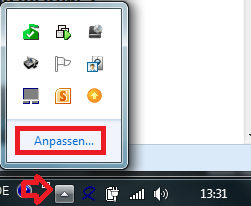
With "Customize" you can define the behavior of the tray icons. The "Info Area Symbols" window opens.
NOTE Below are alternative ways to open this window.

In the settings window for info area symbols, you can define the behavior of each individual tray icon.
Select the corresponding icon and select "Show icon and notifications" as option. After that you will find the tray icon on the taskbar to the left of the clock at any time.
Alternatively, you can enable the option "Always show all icons and notifications on the taskbar". In this case, the tray icons of future programs will also be displayed directly on the taskbar.
Move the mouse to a free area of the taskbar and press the right mouse button. Select Properties from the menu. The dialog for customizing the info area symbols opens on the Taskbar page via the "Customize" button.

As a further option, you can also open the Control Panel via the Start menu. Select "Large Icons" or "Small Icons" in the upper right corner. Now you can open the settings via the "Info Area Symbols" icon.

Because of errors in the operating system or other software, as well as the variety of the hardware used, apparently occurring errors and / or irregularities in the software of abylonsoft must not necessarily be justified in this software. This means that the interactions between our software and software / hardware from other manufacturers are so complex that they cannot be taken into account by us in all cases. Often errors / defects in other software (e.g. the operating system) also occur, which only become effective in combination with our software. These errors usually manifest themselves in a general protection violation or a system crash. For these reasons we subject our software to a very extensive test before release in order to reduce the problems and errors to a minimum.
Should you nevertheless become aware of a direct error in our software, we will correct it as soon as possible. So that we can understand the error / the problem, you should give us all the details:
Please use our support form support form!
for this purposeFor more see AGB's
Questions and answers for compatibility tests of our software products with special hardware.
Microsoft has disabled the automatic installation of the framework .NET 3.5 under Windows 10. This causes crashes and protection violations during the execution of the .NET 3.5 versions of abylonsoft.
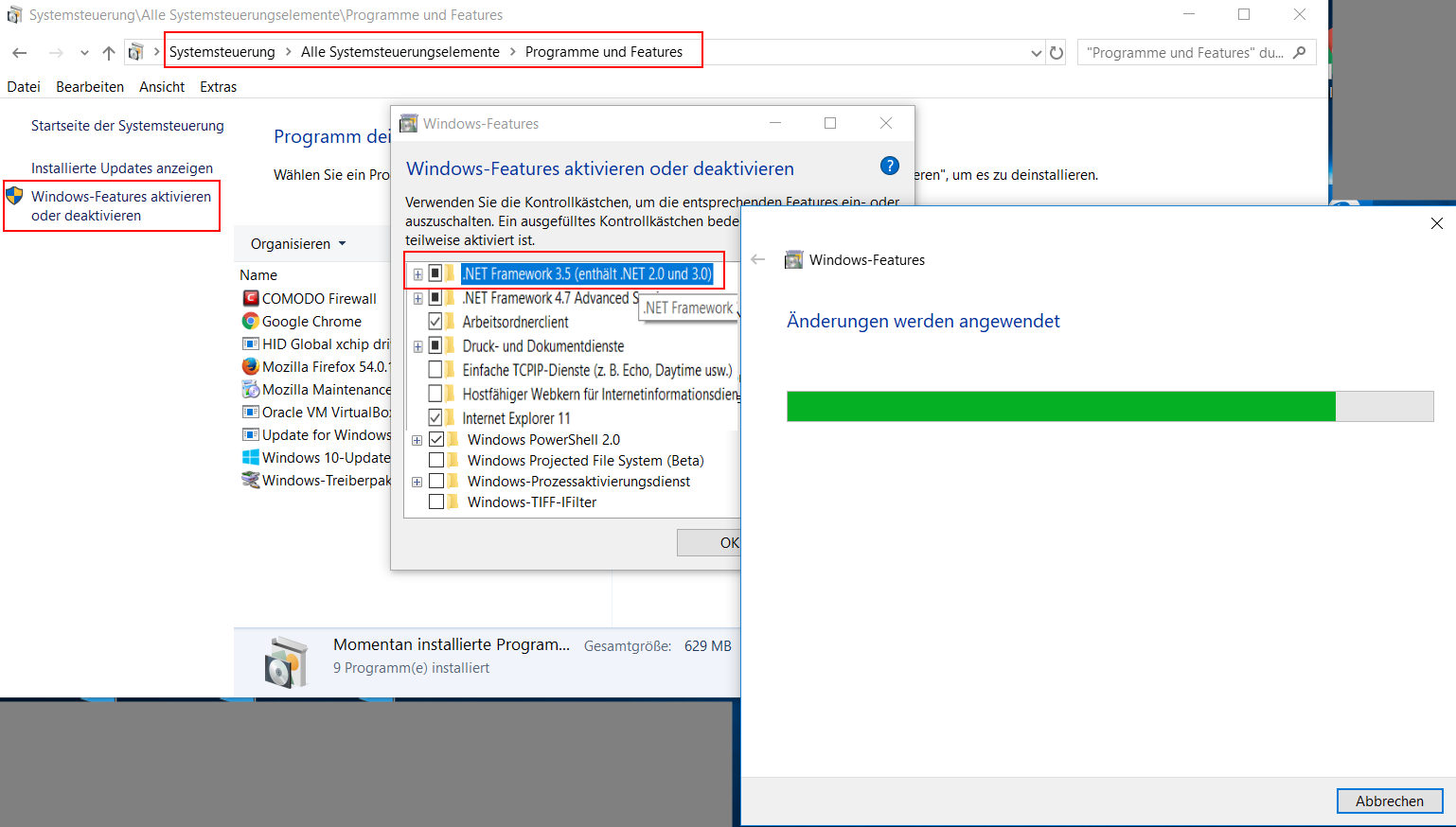
As shown in the screenshot, Microsoft .NET 3.5 can be enabled via the Windows features:
subsequently the version
To use a removable disk (e.g. USB stick) as "key" for login and encryption or mobile use (switch "install modules on USB stick"), the following conditions must be met:
Card reader:
Our software supports all card readers that offer the standard PC/SC interface. In addition, you have to pay attention to which smart cards are supported by the card reader. In addition to contact smart cards, there is a large variety of suppliers and different technologies available for wireless smart cards. Here the supported frequencies 125 kHz (long wave) and 13.56 MH (short wave) are to be mentioned for example.
chip cards:
Our software can be fully tested for 30 days. You should definitely take advantage of this offer. If you have any questions about compatibility, you can also contact us with confidence approach.
On our hardware page you will also find a selection of compatible card readers and chip cards.

Dear Abylon team,
I reinstalled backwards to windows 8.1 from windows 10.
It has been quite some time that i havent been updating this software so is it so that whenever you release new version i must buy it all over again?
Now i have already two (2) activation codes:
00XX-xxxxxxxx-yyyyyyyyyy-L16V0 (newest)
00XX-xxxxxxxx-yyyyyyyyyy-T15V1 (oldest)
Thank you very much!

Hi Tommy,
tThe numbers in the last block of the license key are the version number for which the key is valid. In your case, version 15 and 16.
Currently we offer version 17. However, you can also download the older versions:
Last version 15: https://www.abylonsoft.de/download/logonssopro_v159.exe
Last version 16: https://www.abylonsoft.de/download/logonssopro_v165.exe
If you have any further questions, please do not hesitate to contact us again.
Allow changing to nornal logon (ESC) Logon/Lock-mode does not work. When these options are ON i can change to normal logon ja when these are OFF i can still change to normal logon-mode.
Is there something that i am doing just wrong or is it just a bug?
Thanks, we will test this and correct it if necessary.

I downloaded this on Oct 5, from Giveawayoftheday.
Name or CD-Key:
ONLY-FOR-PRIVATE-USE-GOTD2017
Registry-key:
00EN-xxxxxxxx-yyyyyyyyy-L16V0
I have NO idea on how to install it on a Flash Drive, or how to make it work?? I respect German, was stationed in Wiesbaden AFB, in Army for 3 years. But I no longer can read German.
I am interested in this program, IF I can make it work?
THANKS
Hi Roland,
the software abylon LOGON can only be installed on a Windows PC.
After installation, a USB stick (Flash Drive) or a chip card (only special ones) is then trained as a hardware key. To do this, open the abylon LOGON settings and go to the "Logon accounts" page. A new hardware key is learned via the plus icon. Click on the icon and insert the hardware key. As soon as it is recognized by our software, you will be prompted to enter your Windows login data. Afterwards, an additional PIN can be assigned and an emergency password (SecureID) can be requested. After restarting the computer you can use this hardware key to login.

I downloaded "[i]giveaway of the day on trial version[/i]" of WIN10 and can't logon to WIN10!
Didn't put in a password-can you help?
Don't have a correct passwod so can't run WIN10
Hi James,
If you can not remember your password, there is no way to login. This is similar to an encrypted file. If you no longer know the password, the decryption is also impossible.
Alternatives of the software abylon LOGON for emergencies are:
a) Switch to the "[i]Standard Windows login-screen[/i]"
b) Entering the [i]emergency password (SecureID)[/i]
c) Log in "[i]windows safe mode[/i]" (F9/F10)

Hi,
I have downloaded your program from: giveaway of the day. Each time I click to open a message says: "The setup files are corrupted. Pleass obtain a new copy of the program" CI have tried 3 times, even running as Administrator, without success. Can you help with this matter please/ Thank you.
Kind Regards.
Brian.
Hi Brian,
thank you for your interest in our software. In case of advertising the setup is usually offered by the partner. If you have problems with the download, contact the appropriate agency, in your case GiveawayOfTheDay.com. We did not have any influence on it.
For general comments, please use our Comments Form!