 Einstellungsseiten für abylon LOGON, dem zusätzliche Schutz bei der Windowsanmeldung an Ihren Rechner.
Einstellungsseiten für abylon LOGON, dem zusätzliche Schutz bei der Windowsanmeldung an Ihren Rechner.
 Je nach Programmversion können einzelne, nicht benötigte Seiten ausgeblendet sein!
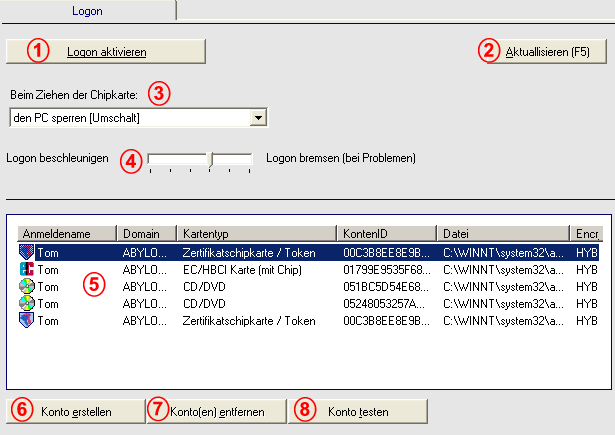
| 1. | LOGON aktivieren / deaktivieren | Aktiviert oder deaktiviert das abylon LOGON Modul, dem zusätzliche Schutz bei der Windowsanmelden an Ihren Rechner. |
| 2. | Aktualisieren | Gleicht die Einstellungen mit anderen Dialogen ab. |
| 3. | Beim Entfernen des Mediums... | Folgende Optionen sind möglich:
|
| 4. | Beschleunigen / Bremsen | Mit diesem Schieberegler können Sie die Geschwindigkeit während des LOGON Vorgangs einstellen. Je weiter links der Regler steht, je schneller erfolgt der Anmeldevorgang. Hierbei können jedoch unter gewissen Umständen Probleme auftreten, weil die Zeit zum Laden alle Module, Treiber und Services des Betriebssystem nicht ausreicht. Dadurch arbeitet abylon LOGON nicht einwandfrei und gibt eine Fehlermeldung aus. Durch das Verschieben des Schiebereglers nach rechts räumen Sie dem Betriebssystem mehr Zeit ein. |
| 5. | Kontoliste | Übersicht über alle eingerichteten Konten mit Auflistung des Anmeldenamen, der Domain, des Kartentyps, der Konten-ID, der Kontendatei und des Verschlüsselungsverfahrens. Zur Zeit mögliche Medien:
|
| 6. | Konto erstellen | Simuliert einen Anmeldevorgang zum Erstellen eines Kontos.
|
| 7. | Konto Entfernen | Löscht die selektierten Konten aus der Liste 5. |
| 8. | Konto testen | Simuliert einen Anmeldevorgang zum Testen eines Kontos.
|
(c) 2001-2007 abylonsoft ( Stand 15.04.2006)
 Die vorgenommene Einstellung wird ignoriert, wenn beim
Entfernen des Mediums gleichzeitig die entsprechende Taste in der Klammer gedrückt wird. Bei der Alt-Taste beispielsweise wird der PC auf jeden Fall ausgeloggt, egal welche Option eingestellt ist.
Die vorgenommene Einstellung wird ignoriert, wenn beim
Entfernen des Mediums gleichzeitig die entsprechende Taste in der Klammer gedrückt wird. Bei der Alt-Taste beispielsweise wird der PC auf jeden Fall ausgeloggt, egal welche Option eingestellt ist. Zertifikatschipkarte / Token
 EC / HBCI Karte (mit Chip)
 Speicherchipkarte
 Externes Speichermedium (z. B. USB-Stick)
 CD / DVD
 RFID-Funkkarten
 Bitte beachten Sie, das eine Anmeldung mit Zertifikatschipkarte (siehe Optionen) nur möglich ist, wenn in der Zertifikatsdatenbank