
Share page: || Newsletter: Subscribe Unsubscribe
Easy to use password manager for your passwords and login data
 This may be because the abylon KEYSAFE has already been started and automatically minimized. Minimized means that the window is reduced and only displayed as a tray icon next to the clock. In the screenshot the
 robot icon is displayed in the tray bar. The window can be maximized again by double-clicking or using the right mouse button menu.
The window can be minimized to the tray icon using the minimize icon at the top right.
Infos about the tray icon can also be found on this page under FAQ-General -> Where can I find the tray icon?!
If only the first line is displayed in the list function, then you should update the software abylon KEYSAFE to the newest version (Download page). After that this problem should be solved.
Alternatively, pressing the Update-Icon will also help!
The structure of the Keysafe-file changes over the different versions. For this reason, larger version jumps are not possible.
ATTENTION From the version update you should absolutely create a backup of the Keysafe files!
Every version currently in use, you should install version 7.3, 8.3 and 10.5 on your computer one after the other.
Example Version 6.5: In this case the setups must be installed in the order 7.3, 8.3 and 10.5, whereby the existing Keysafe file (XML) must be imported in each case.
If the old Keysafe file is not automatically imported, the program abylon KEYSAFE offers the possibility to create a new Keysafe at the first program start. It is also possible to import an existing Keysafe-File.
Example version 8.3 or 9.x: In this case it is sufficient to install version 10.5.
After importing the previous Keysafe file an automatic conversion is offered.
Download: abylon KEYSAFE 7.3
Download: abylon KEYSAFE 8.3
Download: abylon KEYSAFE 10.5
After the import has been completed, you can install the current software version.
If you have any problems, please feel free to contact us (-> support form)!
At the first start of the program you will be asked if you want to create a new file or import an existing file (XML format).
If a KEYSAFE file already exists and you still want to create a new file, proceed as follows. Find the existing vault file that is normally located in the Documents and Settings directory. The best way to find the file is to use the File Explorer search function to search this directory for the XML file. By default, the file name corresponds to your login name (your_login_name.xml). Rename the file and restart the software. Now you will be asked if you want to restore the file through the backup. Here you answer with NO. Now a new, empty vault file will be created with the same name.
TIPP If you have problems with the access rights, you should also rename the key file with the same name (your_login_name.xmk)!
After the first start of abylon KEYSAFE you can choose a place to save it yourself. Default is your own directory\apm. You can create a backup of the vault file (XML format) at any time. However, if you change your password after the backup, this does not apply to the saved file. In this case you must enter your old password.
Information about password usage and related security issues.
For this purpose, a mouse click event was inserted programmatically from version 19.10.1 and 2020.1 on. If there are problems with this, it can be switched on or off via the registry. To do this, under HKEY_LOCAL_MACHINE\SOFTWARE\abylon\[PROGRAM NAME, e.g. ENTERPRISE]\FLAGS set the value FWACTIVATEWINDOW from YES to NO.
After the password entry the software displays the message "The entered password is wrong or the key file (certificate) does not belong to this object!". What is the reason for this?
Please check first whether the password was really entered correctly or the keyboard layout has changed.
Another possibility is that the password scrambler converts certain special characters into other characters. For this reason it is necessary in such cases to activate or deactivate the password scrambler according to the creation of the encrypted element. I.e., if the password scrambler was activated during encryption, it must also be activated during decryption.
The password scrambler must be deactivated in any case if a password or the SecureID are entered into the password field via Copy&Paste. Otherwise, the program will not recognize a keyboard entry and the password field will remain empty.
The SecureID is a so-called emergency password. If the chip card or USB stick is defective or lost, this can be entered as an alternative for decryption.
The SecureID is determined during the encryption process on the page 'Key management >SYMM-System'.
The SecureID is identical for each encrypted object (abylon KEYSAFE, abylon CRYPTDRIVE, abylon BASIC, abylon SHAREDDRIVE) and is built as follows:
# + 32 characters + . + 32 characters + #
(characters only numbers 0-9 or letters A-F; e.g. #A54E1CB23F31464AC3B7D65F4557C1D1D. 50F4B4A9EC30705944EB12870284C419#
NOTE
- Starting with version 8.3, both upper and lower case letters can be entered. In older versions the input is Case-Sensitive.
- The password scrambler should be deactivated for input!
- The SecureID should be stored in a secure place!
- The SecureIDs are different for encryption and Windows logon.
A "brute force attack" means trying out all possible character combinations of passwords. For example, the process starts with 00000001 and then continues with 00000002, 00000003, 00000004.... A password that has only 4 digits and consists only of numbers can easily be "cracked" within a few seconds. A good password should consist of at least 12 characters with lower case letters, upper case letters, numbers and special characters. In addition, no words from dictionaries, names or relevant password databases should be used. If you follow these rules, you can be sure that it will not be possible to decrypt the protected data economically in the foreseeable future.
Unfortunately / fortunately it is not possible to open protected data without the corresponding password. I.e., the software of abylonsoft offers neither a back door nor a so-called "general key". If you have lost your password, you can no longer access your stored data.
You should remember the used passwords well and possibly write them down in a secret place. However, this should not be on the hard disk or near the computer. Alternatively, so-called password managers (such as abylon KEYSAFE) offer the possibility to store the different passwords in a secure database. In this case you only have to remember a password
An insecure password is always a date of birth, a nickname, a name in principle or any other word that is frequently used or that is in the dictionary.
A secure password is a password consisting of several random characters, e.g. myz<_/k)),%06YLbcw3pU. It consists of special characters ( ! "§$%&/()==?´*?+#´\ß^.;:_@<>|{[]}), numbers (1234567890), uppercase letters (QWERTZUIOPÜÄÖLKJHGFDSAYXCVBNM) and lowercase letters (qwertzuiopüäölkjhgfdsayxcvbnm).
If you cannot remember such a password, you can use a trick. Although the password is not as secure as the previous one, it is still much more secure than "Otto" or "Müller". And this is how it works. Think of a long sentence that you can easily remember, such as : I live in the model city 134b. My phone number is 123456789. Now simply take the first letters / characters from this sentence. In this case that would be? IwidM1.Mti1.?. However, you should make sure that at least some numbers and special characters are present in the sentence. In addition you must pay attention to upper and lower case.
To create a really secure password, you should use the integrated password generator. You can find it for example in abylon KEYSAFE.
Questions and Answers about the installation of software products from abylonsoft.
Usually, with abylonsoft software, the new version can be installed over the old version. This is also the case if the setup asks in advance and offers the uninstall option. If an over-installation for any reason is not possible, so you will be pointed out during installation. In this case no other option is offered.
Yes, because during the installation the software has to make some settings for which only the administrator has rights. So log in for the installation as an administrator or contact your responsible administrator.
Possible cause of error:
Updates in the same major version number are free. Updates to the next major version number are subject to an update fee. If you have any questions or problems with us you are welcome to contact us in Kontakt.
This is because when a new user is created, Windows first creates the registry and makes entries. Since our software also has to make registry entries, an operating system restart is required for proper operation.
.If this error occurs, you should manually download and install the setup from the download page. All settings of the previous version will be adopted.
General questions and answers about the software from abylonsoft.

We unfortunately had to realize that Microsoft has changed something since the end of the Windows 7 support. Since that time it seems to be necessary to install a so-called Redist-Pack of Microsoft Visual Studio. This was not necessary before, but now it seems to be absolutely necessary. Please download and install the Redist-Pack of Microsoft Visual Studio 2008.
Alternatively please use our contact form for further information! Please indicate the software version and operating system.
From version 19.1 or 2020.1 the appropriate Redist-Pack is delivered with the setup.
First of all, passive RFID tokens (chip cards or key fobs) need a magnetic field or high-frequency radio wave to be supplied with energy. This is usually done by the RFID card reader. The data integrity on the RFID token is not endangered by light magnetic or radio fields. The data is not likely to be erased, for example by a mobile phone, a magnet or a monitor. However, an electromagnetic interference source can lead to an impairment of the reading reliability.
Storing the RFID token in the same pocket as the mobile phone is no problem. In order not to disturb the reading process, the RFID card reader should be placed as far away from electromagnetic sources as possible! In a microwave, on the other hand, the RFID token is likely to be destroyed.
Tray-Icons are small buttons, which are displayed in the taskbar at the bottom right, next to the clock.
These icons are used to display information and call functions. In the preferences, Windows deactivates tray icons of programs so that they are not displayed for the time being. The following section describes how the settings for all or individual icons can be set.
NOTE The description is general. Depending on the program, you must select the appropriate tray icon. You can find this in the help or the FAQ's.
To the left of the clock, there is a small white arrow pointing upwards, which can be used to display the other tray icons.
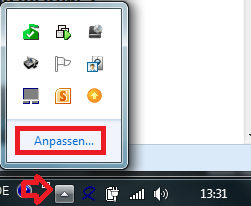
With "Customize" you can define the behavior of the tray icons. The "Info Area Symbols" window opens.
NOTE Below are alternative ways to open this window.

In the settings window for info area symbols, you can define the behavior of each individual tray icon.
Select the corresponding icon and select "Show icon and notifications" as option. After that you will find the tray icon on the taskbar to the left of the clock at any time.
Alternatively, you can enable the option "Always show all icons and notifications on the taskbar". In this case, the tray icons of future programs will also be displayed directly on the taskbar.
Move the mouse to a free area of the taskbar and press the right mouse button. Select Properties from the menu. The dialog for customizing the info area symbols opens on the Taskbar page via the "Customize" button.

As a further option, you can also open the Control Panel via the Start menu. Select "Large Icons" or "Small Icons" in the upper right corner. Now you can open the settings via the "Info Area Symbols" icon.

Because of errors in the operating system or other software, as well as the variety of the hardware used, apparently occurring errors and / or irregularities in the software of abylonsoft must not necessarily be justified in this software. This means that the interactions between our software and software / hardware from other manufacturers are so complex that they cannot be taken into account by us in all cases. Often errors / defects in other software (e.g. the operating system) also occur, which only become effective in combination with our software. These errors usually manifest themselves in a general protection violation or a system crash. For these reasons we subject our software to a very extensive test before release in order to reduce the problems and errors to a minimum.
Should you nevertheless become aware of a direct error in our software, we will correct it as soon as possible. So that we can understand the error / the problem, you should give us all the details:
Please use our support form support form!
for this purposeFor more see AGB's
Questions and answers for compatibility tests of our software products with special hardware.
Microsoft has disabled the automatic installation of the framework .NET 3.5 under Windows 10. This causes crashes and protection violations during the execution of the .NET 3.5 versions of abylonsoft.
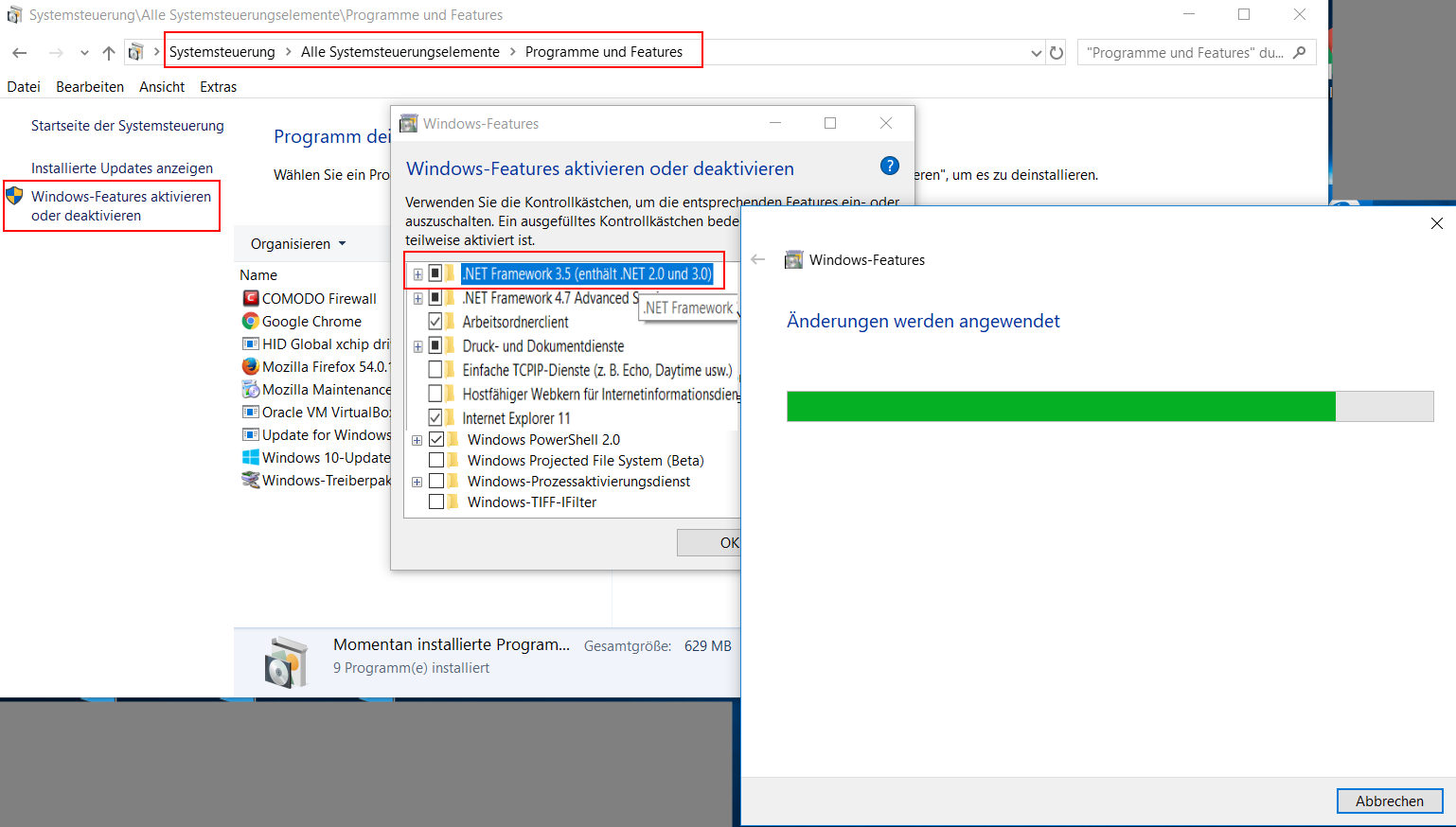
As shown in the screenshot, Microsoft .NET 3.5 can be enabled via the Windows features:
subsequently the version
To use a removable disk (e.g. USB stick) as "key" for login and encryption or mobile use (switch "install modules on USB stick"), the following conditions must be met:
Card reader:
Our software supports all card readers that offer the standard PC/SC interface. In addition, you have to pay attention to which smart cards are supported by the card reader. In addition to contact smart cards, there is a large variety of suppliers and different technologies available for wireless smart cards. Here the supported frequencies 125 kHz (long wave) and 13.56 MH (short wave) are to be mentioned for example.
chip cards:
Our software can be fully tested for 30 days. You should definitely take advantage of this offer. If you have any questions about compatibility, you can also contact us with confidence approach.
On our hardware page you will also find a selection of compatible card readers and chip cards.

i have exported saved passwords from my Web browser to a csv file. there are lots of them, how do I import them?

Thank you for your interest in our software.
Unfortunately, I have to inform you that we do not offer password import.

Name/CD Key & License Key you emailed me is not being accepted when tring to activate & or Register program
Hello Joe,
thank you for your interest in our software. As you can read on the page for requesting the free registration data, this data is ONLY valid for the respective version from the corresponding partner. In your case, it is the free covermount that we offered in March 2020 via our partner SharewareOnSale.
Either you check our offer page regularly and wait until we offer the desired software again. If the software is needed directly, it must be registered for a fee.

I have an older version of KeySafe on an old Laptop.
Now I want to migrate my KeySafe data to my newly installed Laptop to a newly purchased version of Keysafe.
All I could find on my old laptop was a file named "jemp - safe.xmk" and a file named "jemp - safe.xml".
How can I import my old data now ?
Hi Jemp, the decisive factor here is whether the older version is greater than 10.5. In this case you can simply import the Keysafe file.
After the installation of the software, you will be asked whether a new Keysafe file should be created. If you confirm this, a further selection window will appear afterwards. Here you can click on the option "Import existing Keysafe file" and then select the XML file. Alternatively, this is also possible in the Keysafe dialog in the tab "Settings".
If the previous version is less than 10.5, then you have to do some intermediate steps. You can find the instructions in our FAQs.
Please make sure to back up the XMK and XML files of the updates.

When I try to open the keysafe file, it just give me a popup window: "Your keysafe version is to old. Please try verson 10.x to convert to version 11.x or higher!" But I have installed newest version and the keysafe file is built by this version.
Hi Alger,
that sounds weird. Since when has this problem existed? What has changed on your computer in the meantime?
Normally this message is only displayed if you have installed an encrypted container of a Keysafe version smaller than 10 on your computer and it has to be converted to the new format.
Best regards
Thomas

Sehr geehrte Damen und Herren
ich habe heute einen Tag lang versucht Keysafe zu installieren. Alle Versuche das Programm zu installieren scheiterten daran, dass es als gefährliche Software eingestuft wurde. Auch das Abschalten des Defenders war wirkungslos.Ebenso das Eintragen einer Ausnahmeregelung. Den Virenschutz habe ich auch abgeschaltet.
Ich komme ohne Ihre Hilfe nicht weiter. Da ich das Produkt bezahlt habe, bitte ich Sie, mir das Programm auf einem anderen Weg mir zuzusenden, was doch möglich sein müsste.
Ich verstehe nicht, warum Abelsoft als gefährlicher Softwarehersteller eingestuft wird und die Software gesperrt wird, wobei es egal war um welchen Internet Browser ich auch benutzte. Ich habe es mit 3en versucht. MfG
Wolfgang GvM
Hallo Wolfgang,
zunächst einmal, unsere Firma abylonsoft hat nichts mit abelsoft zu tun.
Leider haben wir keinen Einfluss auf Virenscanner und Co. Diese blocken teilweise einfach Dateien, weil diese unbekannt sind.
Sie können unter folgenden Link das Test-Ergebnis ansehen. Dort haben 67 Virenscanner im Setup der Software abylon KEYSAFE keine Bedrohung gefunden. Link

Your product key:
Username: Brian
Key: 00EN-12345678-1234567890-Q12V1 (anonymized, no valid code!)
Hi,
I re-imaged my computer, and :AbyLon Keysafe" says registration information is incorrect. Can you please reset key? Thank you.
Kind Regards.
Brian.
Hi Brian,
your registration key is valid for our version 12.x of abylon KEYSAFE. If this is a commercially purchased version, you can download it under http://www.abylonsoft.de/download/keysafe_v129.exe.
Please uninstall the prior version 14 and restart the computer.
Alternatively, we offer a reduced update price. You need to enter the 3rd part of their previous registration key as coupon code when ordering.

Hi, I can't even get started - purchased it from sharewareonsale and I can't use it because deleting it doesn't delete master key.
Hello Susan Causey, unfortunately your problem is not entirely clear.
If you forgot your Keysafe password, then only remaining option to delete your old Keysafe and create a new Keysafe.
To do this open the Keysafe without entering the password and go to the "[i]Settings[/i]" page by navigating with the arrow icon. Here you can create new Keysafe files or even delete the old Keysafe.
Alternatively, you can call up the settings dialog on the entry in the start menu also.

Hello:
Simple problem:
Name or CD-Key: ONLY-PRIVATE-USE-SOS2014
Registry Key: 00EN-562XX386-006EBXX940-Q12V1 (anonymized!)
If your firm sent me this key, how the hell is it "invalid"?
Hello Carl,
the registration details are checked and should work. Please note, however, that the [b]registration data specified only for the freebie version of Sharewareonsale.com[/b] and are not valid for the official version of our homepage.
For general comments, please use our Comments Form!