AntiSpy and process monitoring Permanently blocks unwanted monitoring, applications, services and drivers
Process monitoring Information at any time
When a program is started, it is loaded into the main memory of the computer. This turns the program into a process that performs a task. Under Windows, the processes are displayed as List in the Task Manager. The process context is also distinguished. Windows distinguishes between processes in User context and all others. This also includes services, for example. The number of processes can easily rise above 100.
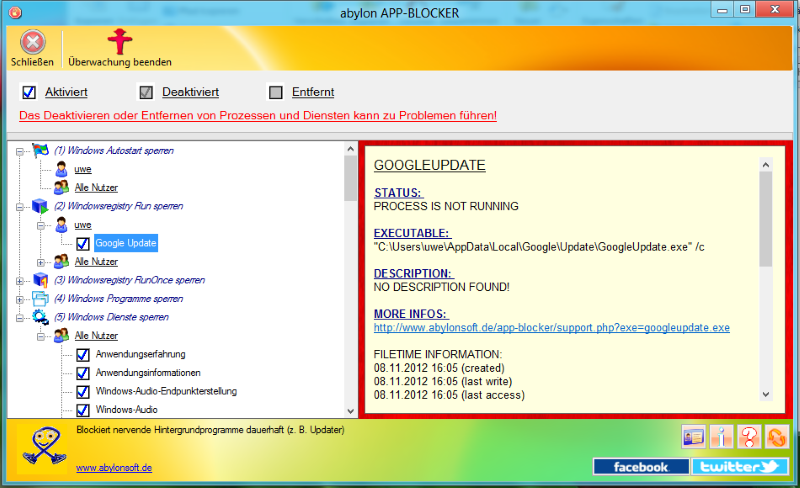
The process monitoring of the software abylon APP-BLOCKER lists all visible and invisible processes in a list. For the individual processes a short information is displayed. Additional information can be accessed via a link on the Internet. Many processes are necessary to enable error-free operation of the computer. However, other processes perform tasks that are not absolutely necessary. Or programs are permanently loaded into the working memory via autostart or registry. These can be simply deactivated or terminated over the software abylon APP-BLOCKER. The software remembers the settings, so that even after a restart of the computer the processes are not executed again.

AntiSpy Less surveillance - more privacy
Today it is said that data is the new gold. As a result, more and more companies are collecting data about the user behavior of their potential customers. Also operating systems and many other programs belong to it and collect diligently information about the interests and the behavior of the computer users. These help Windows to improve the operating system or to give certain recommendations for action. Windows offers the possibility to change the privacy settings, but these are sometimes very hidden or certain options are not publicly accessible.
If your privacy is important to you, you can switch off further spy and tracking functions of Windows with the software abylon APP-BLOCKER. The monitoring functions are deactivated with a click on the AntiSpy switch. This disables non-critical services, makes registry entries, and disables communication with known monitoring servers. Individual settings are possible at any time. With the AntiSpy features, you decide how important your privacy and the Privacy is to you.
Awards for abylon APP-BLOCKER All Awards

100% CLEAN Certified by Softpedia

100% CLEAN Certified by Softpedia

Aol-Soft.com Award

Download-Mix-Rezension von Axel Gerken
abylonsoft software development presents the Major Update 2025 with improvements in performance and stability. A highlight is the new abylon ... read more
The annual major update has finally been released. The long wait will be worth it for our customers. We were able to significantly increase the ... read more
With Windows 11 Microsoft has released a new version of its operating system. The first test of the abylonsoft software in the version 20.60.2 and ... read more
Corona keeps us far under its spell and stops daily life in many areas. But the software from abylonsoft is constantly being developed further and ... read more
The major update to version 19.x and 2020 will take place in February 2020, and we have now added a minor update in March. Besides the general ... read more
Back
Vor
Enter comment
Please use our support form for support requests Support form!